Time back, every year
Employees estimate automation could save them around 240 hours a year — roughly six working weeks per person spent on data entry, chasing, and status checks that a workflow can simply do for them.
AI workflow automation
Avcora builds AI workflows that clear the admin sitting between your systems — enquiry follow-ups, onboarding chasing, invoice nudges — so your team stops doing it by hand.
Hosted and monitored by us or run by your team — with human approval where it matters and a full audit trail.
Why automate now
The repetitive admin between your systems — chasing, copying, updating, reporting — quietly drains days out of every month. Automation hands that time back so your people can spend it on customers and growth instead of busywork.
Employees estimate automation could save them around 240 hours a year — roughly six working weeks per person spent on data entry, chasing, and status checks that a workflow can simply do for them.
Copy-paste and re-keying invite mistakes that cost hours to unpick. Automating the same steps cuts error rates by up to 75% and applies your rules the same way every single time.
Manual processes quietly burn 20–30% of the effort behind everyday work. Automating just a handful of core processes trims that cost — most businesses see the return within the first year.
Workflows & agents
You don't have to decide alone — but here's the difference in one glance. A workflow runs a fixed set of steps the same way every time. An agent watches what comes in, decides what to do, and uses your tools to do it. Agents sit above workflows: they choose which one to run, or handle it themselves.
If it just needs doing — use a workflow.
A fixed sequence that runs the same way every time. Predictable, testable, and the lowest cost. Best when the steps are known and rarely change — like sending a reminder when an invoice is overdue.
If it needs thinking — use an agent.
Watches an input, decides what to do, uses your tools, and asks for approval only when it matters. Best when a person would have to read the situation and choose a path — like an email that could be a cancellation, a complaint, or a sales lead.
Most teams start with a workflow. When a process needs judgement — reading an email and deciding which of several things to do next — that's where an agent earns its place. Below is the full ladder, from a simple workflow to an agent that acts across your business.
What we do
Four levels, increasing in judgement and reach. Most engagements begin at the bottom and climb as the work proves itself. Any level can be built and handed to your team, hosted and monitored by us, or guided through consulting.
Fixed, predictable automations. A trigger runs the same steps every time — the right answer when the process is known.
From £1,000
Watches one input, classifies requests, drafts responses, and updates a couple of systems — asking for approval before anything important.
Example: read incoming membership emails, identify cancellations, draft replies, update a tracker, and flag unclear cases.
From £2,000
Connects 3–5 systems, decides between different workflows, and handles the exceptions that would otherwise stall a fixed pipeline.
From £5,000
Acts as an operations assistant across several business areas — with memory, dynamic tool use, and the governance to handle sensitive decisions with limited human approval.
Example: act as an operations assistant across email, CRM, billing, scheduling, documents, and customer support.
Contact us
How it works
The first call is about finding the smallest useful workflow — the one with volume, clear rules, and a measurable cost when it slips.
We sit down and trace the process end to end: the trigger, every system it touches, the rules, the approvals, and the outcome you actually want. You leave the call with a one-page workflow map.
We build the workflow — integrations, prompts, routing, and the audit trail — against real examples from your tools, not toy data.
Real cases are run through it. We tune the edge cases, tighten the prompts, and make the approval gates feel obvious to the people using them.
It goes live in your cloud or ours. If we host it, we monitor failures, watch usage, and keep the integrations honest as your tools change.
Use cases
The best first automation is usually boring, repeated, and expensive to miss. The cards below are workflows — fixed steps that run the same way every time. Underneath are a few agent examples for when the work needs judgement.
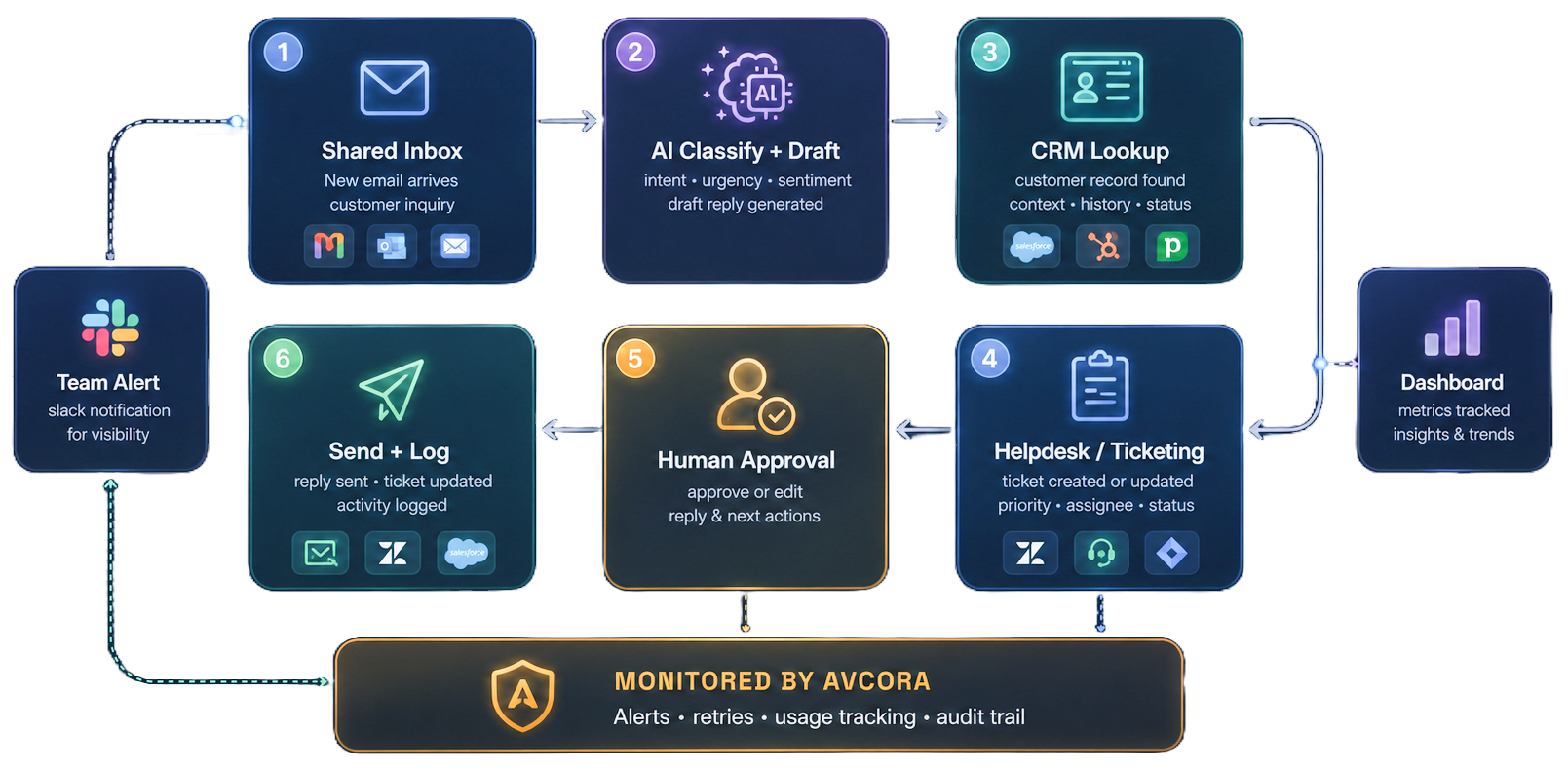
Reads incoming membership emails, identifies cancellations among the noise, drafts the correct policy reply, updates a tracker, and flags unclear cases for a person.
Watches invoices and payments across Stripe, the CRM, and email, decides whether to send a reminder, chase by phone, or hold — and logs every decision.
Acts across email, CRM, billing, scheduling, and documents — handling a member's whole request end to end, escalating only the sensitive or high-value steps.
Pricing
Workflows are priced by how many systems they connect. Agents are priced by how much judgement and reach they need. Both are one-off builds; ongoing hosting and consulting sit below. Not sure which you need? Start with the workflow-vs-agent comparison.
£1,000
A fixed-price build for a focused process with up to three systems connected.
£1,500
For workflows with a few more moving parts while staying bounded and testable.
Scoped
We map it together and decide whether to split it into phases. A clear estimate before any build starts.
£2,000
Watches one input, classifies, drafts, and updates 2–3 systems — asking approval before anything important.
£5,000
Connects 3–5 systems, decides between workflows, and handles the exceptions a fixed pipeline would miss.
Let's talk
Acts across several business areas with memory and dynamic tool use — governed for sensitive, high-value decisions with limited human approval.
Avcora hosts and monitors the workflow after implementation. Infrastructure and token usage are passed through at cost.
£100/month + expenses
For larger hosted workflows that need more connected services, checks, and operational oversight.
£150/month + expenses
Discovery, architecture, prompt design, debugging, and review on your machines with Claude and Codex.
£200/hour
What are expenses? The pass-through costs of running the workflow — infrastructure, AI tokens, and any paid third-party services the automation needs. Billed at cost, with no markup.
Case studies
Practical examples of the workflows we build, including anonymised projects and representative engagement patterns. They show the operational detail behind the automation and how human control is preserved.
Upcoming appointment
Human review before sending
Less recurring admin
Cancellation email
Human approval before reply
Policy followed, no chasing
Security & control
We use AI where it earns its place and ordinary software automation where that is better. Sensitive steps stay human-approved before anything is sent, changed, or cancelled — and every action is traceable after the fact.
Separate identities for each workflow where your tools support them — never shared logins.
Secrets stored encrypted and scoped per workflow, not pasted into shared password vaults.
Each workflow gets only the access it needs to do its job — nothing broader.
Customer-facing, sensitive, or policy-heavy actions wait for a person before they happen.
Every trigger, decision, and action is recorded, so you can see exactly what happened and when.
FAQ
If the steps are known and run the same way every time, that's a workflow — cheaper and very predictable. If a person would have to read the situation and decide which of several things to do, that's an agent. Most teams start with a workflow and add an agent when judgement enters the picture. See the comparison — and you don't have to decide before the call; that's partly what the consultation is for.
Any tool the workflow reads from, writes to, watches, or uses as a trigger. Email plus CRM plus Slack would usually count as three connected systems.
Yes. Implementation work is built to be deployable outside Avcora's cloud. If you would rather we operate it, choose managed hosting and monitoring as an ongoing service.
The pass-through costs of running the workflow — infrastructure, AI tokens, and paid third-party services the automation needs. Billed at cost, with no markup.
Sometimes, but not by default. Customer-facing, sensitive, or policy-heavy steps usually include a human approval gate before the workflow sends, changes, or cancels anything important.
We send a short questionnaire so the call can focus on useful automation candidates instead of collecting basics. Completing it before the call is required — if it's not done, we reschedule so the consultation stays useful.
Next step
Implementation, managed hosting, or consulting — the first call is about finding the smallest useful workflow and the right delivery model for your team. 30 minutes, no charge.